 Specs
Specs
ASUS ProArt Display PA279CRV
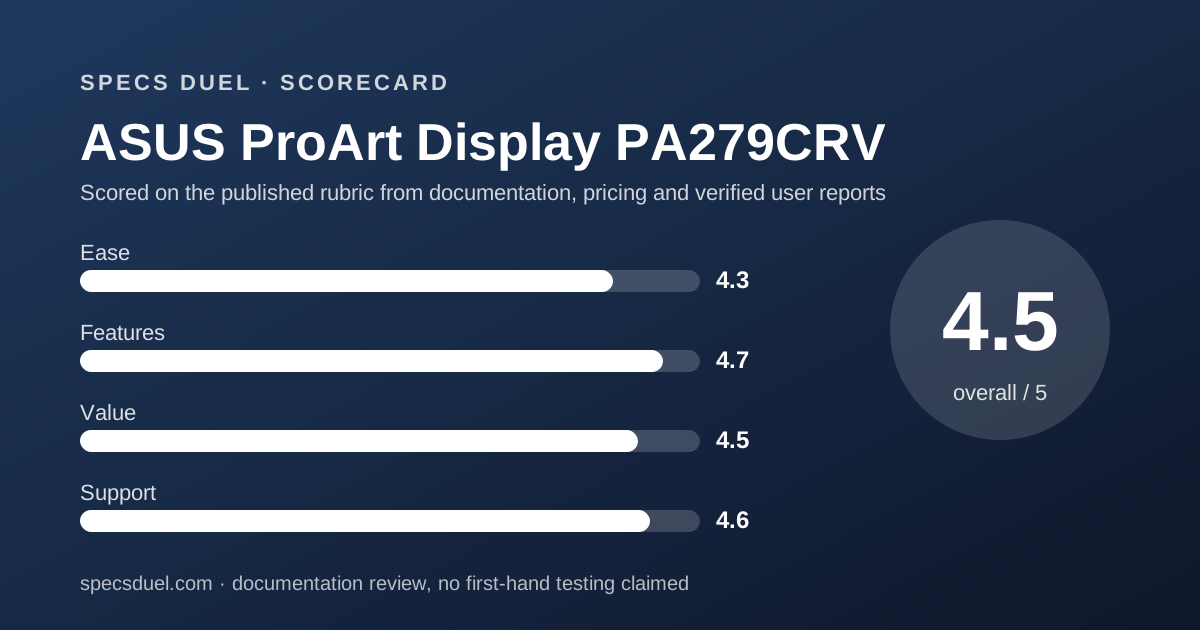
The fullest published sheet in this 27-inch 4K cluster, and the only one here printing Adobe RGB and DCI-P3 figures
Scored on the published rubric, from documentation, pricing and verified user reports.
Best for: Colour work on a 27-inch 4K panel where the buyer wants Adobe RGB, DCI-P3 and Delta E printed by the maker, four video inputs on the back, and a bright-dot warranty that runs the full three years.
Verdict
The ASUS ProArt Display PA279CRV prints more rows than any other sheet in this 27-inch 4K cluster. ASUS publishes an IPS panel at 3840x2160, 163 PPI, 0.155 mm pixel pitch, 100% sRGB, 99% Adobe RGB, 99% DCI-P3, colour accuracy stated as Delta E under 2, 1073.7M colours at 10 bit, 350 cd/m2 typical and 400 cd/m2 HDR peak brightness, 1000:1 typical and 3000:1 maximum contrast, 60 Hz maximum refresh, 5 ms GTG response, two HDMI 2.0 inputs, two DisplayPort 1.4 inputs with daisy chain, one USB-C carrying 96 W of power delivery, a four-port hub, 26.14 W power draw, 5.78 kg with the stand and 4.07 kg without, and a three-year LCD zero-bright-dot warranty. This is a documentation review assembled from the asus.com US overview page, its tech-spec table and the model warranty page, all read on October 13, 2026. Nobody here switched the monitor on, and no figure below was measured. The weak rows are a missing KVM switch, a 60 Hz ceiling, and a price that only appears once the page is rendered by a browser.
Visit ASUS ProArt Display PA279CRV
We have no affiliate relationship with this vendor. Link goes to the official site.
Where it is strong
- Fullest table in this cluster: sRGB, Adobe RGB and DCI-P3 figures, pixel pitch, PPI, three weights, two dimension sets and three power states
- 99% DCI-P3 and 99% Adobe RGB with colour accuracy stated as Delta E under 2, the only wide-gamut figures published in this group
- Four video inputs: two HDMI 2.0 and two DisplayPort 1.4 with daisy chain, alongside USB-C at 96 W power delivery
- Lowest published power draw here at 26.14 W, with under 0.5 W in power saving and 0 W on the hard switch
- Zero bright dots covered for the full 36 months per the model warranty page, plus up to five dark dots
- EPEAT Gold, Energy Star, TCO Certified, Calman Verified, VESA DisplayHDR 400 and two TUV marks all listed in the certificate block
Where it falls short
- No KVM switch row anywhere on the tech-spec table, which is the one feature the BenQ sheet prints and this one does not
- 60 Hz maximum refresh and 5 ms GTG, so nothing on this sheet suits fast motion
- The $429.00 ASUS Store price renders only in a browser; a plain fetch of the same URL returns the table with no price at all
- Contrast is printed twice, 1000:1 typical and 3000:1 maximum, with no measurement condition given for the higher number
- No Pantone validation row and no owner score anywhere on the product pages
What the ASUS ProArt PA279CRV actually is
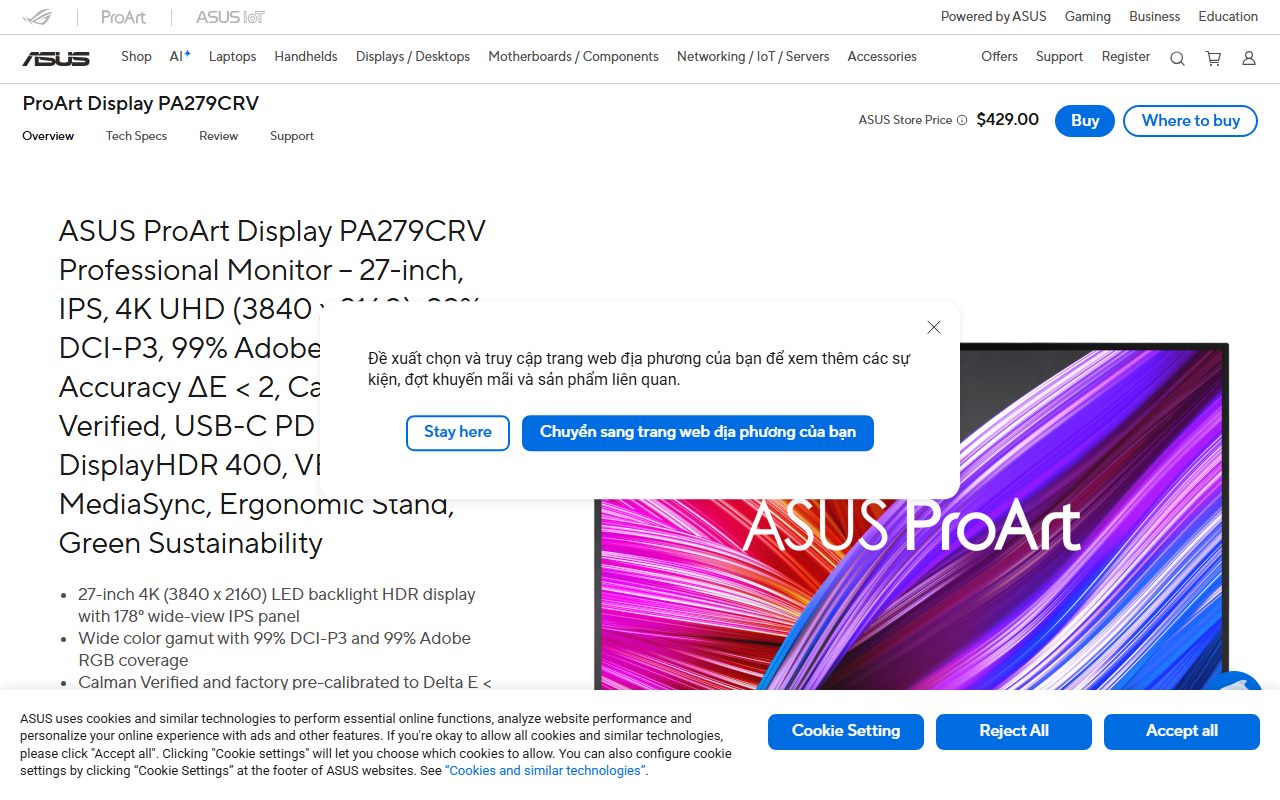
The PA279CRV is a 27-inch 4K IPS monitor aimed at colour work, sold through ASUS as part of the ProArt line. The panel is anti-glare with an LED backlight, and the stand tilts, swivels, pivots and rises.
The interesting part of this model is not a feature, it is the table. ASUS fills in rows that most makers leave blank: pixel pitch, PPI, viewing angle at a stated contrast threshold, three separate weights, two dimension sets and three power states.
This page is a documentation review. Every number here comes from the asus.com US overview page, its tech-spec table and the model warranty page, read on October 13, 2026.
These are published figures, not laboratory measurements, and no part of this is a brightness or colour test.
The short version: this sheet answers more questions than the BenQ PD2706U or the Samsung ViewFinity S80TB, and asks the buyer to accept a price that is awkward to read.
Who the ASUS ProArt PA279CRV is best for
The sheet points at a buyer who grades monitors by what the maker is willing to print.
- Photo and video work where Adobe RGB and DCI-P3 coverage have to be published figures rather than marketing adjectives
- A desk with more than two machines, since four video inputs and DisplayPort 1.4 daisy chain are both on the sheet
- A single-cable laptop setup needing up to 96 W of power delivery through USB-C
- Print and press work that wants a factory colour pre-calibration report in the box, which ASUS lists in the accessories block
- Buyers who read warranty tables and want zero bright sub-pixels covered for the full 36 months, not for a 30-day claim window
- Procurement that needs EPEAT Gold, Energy Star and TCO Certified listed by the maker
- Who should skip it: anyone who needs a KVM switch in the monitor, because no KVM row exists on this table
- Who should skip it: anyone shopping above 60 Hz, since the refresh row stops at 60 Hz
The numbers ASUS publishes, and the ones it does not
The display block prints 3840x2160 on a 27-inch IPS panel, 163 PPI, 0.155 mm pixel pitch, a 596.73 x 335.66 mm viewing area, 178 degrees horizontal and vertical at a contrast ratio of 10 or better, and an anti-glare surface over an LED backlight.
Colour is the strongest block: 100% sRGB, 99% Adobe RGB, 99% DCI-P3, 1073.7M colours at 10 bit, colour accuracy stated as Delta E under 2, gamma selectable at 1.8, 2.0, 2.2, 2.4 and 2.6, and ten ProArt presets including Rec.709, Rec.2020, DCI-P3, Adobe RGB, DICOM and sRGB.
Brightness is 350 cd/m2 typical and 400 cd/m2 at HDR peak. Contrast is printed twice, 1000:1 typical and 3000:1 maximum. Refresh tops out at 60 Hz, response is 5 ms GTG, HDR support is listed as HDR10, and Adaptive-Sync appears as the VRR row.
What is not on the table as of October 13, 2026: any KVM switch row, any Pantone validation row, any owner score, and any measurement condition behind the 3000:1 figure. The dimension and weight blocks are both labelled as estimates that vary by region.
How the price and warranty are structured
The price row is unusual and worth stating plainly. A plain fetch of the tech-spec URL returns the whole specification table and no price at all. Rendered in a browser, the same page shows an ASUS Store price of $429.00.
That is a reading problem, not a missing figure, and the distinction matters: ASUS does publish the number, it just publishes it in a way that a simple page fetch cannot see.
The overview page carries no separate MSRP, only prices for related accessories and mini PCs.
The warranty page for this model states that the warranty applies for a 36-month period from the date the product was first purchased by an end customer.
For the PA series the bright and dark dot table allows 0 bright sub-pixels and up to 5 dark sub-pixels across the whole 36 months.
Bundled accessories delivered with the monitor, such as cables and free gifts, are excluded. Adaptors and built-in batteries carry 12 months where they apply.
The certificate block lists EPEAT Gold, Energy Star, TCO Certified, Calman Verified, VESA DisplayHDR 400, VESA MediaSync Display, Mac compliance, TUV Low Blue Light and TUV Flicker-free.
Ease of use: what the 4.3 is built from
Ease rewards a sheet that tells the buyer how the monitor will sit on a desk and what plugs into it.
ASUS prints tilt from +23 to -5 degrees, swivel plus or minus 30 degrees, pivot plus or minus 90 degrees, height adjustment across 0 to 130 mm, a 100x100 mm VESA pattern and a Kensington lock slot.
The height travel is the longest in this cluster: 130 mm against 120 mm on the Samsung sheet and 110 mm on the BenQ. The quick release stand is listed in the accessories block, as are HDMI, DisplayPort and USB-C cables.
On-screen tools printed on the sheet include QuickFit Plus, PIP and PBP, ProArt Palette, ProArt Chroma Tune, five colour temperature modes and RGB gain and offset tuning.
Deductions: there is no KVM row, so a two-computer desk still needs a separate switch or two keyboards. There is no remote or hotkey puck in the accessories list, where BenQ ships one.
The monitor is 61.22 cm wide, which is wider than its 27-inch class suggests.
Features: what the 4.7 is built from
Features are graded on documented hardware, and this is where the sheet runs away from the cluster. Four video inputs is twice what the BenQ PD2706U or the Samsung S80TB publish, and DisplayPort 1.4 daisy chain is printed on only this sheet.
The gamut block is the other win. ASUS is the only maker in this group that publishes both an Adobe RGB figure, 99%, and a DCI-P3 figure, 99%, next to 100% sRGB. BenQ publishes 95% P3 and 100% sRGB but no Adobe RGB number.
Samsung publishes 99% sRGB and no wide-gamut figure at all.
USB-C power delivery at 96 W is the highest here, against 90 W on both rivals. The hub is one USB-C plus three USB-A at 3.2 Gen 1. Speakers are 2 W x2, the quietest published pair in the cluster.
What is missing is narrow but real: no KVM switch, no Ethernet port and no Pantone validation. A 4.7 means the hardware list is the longest here and the omissions are specific rather than structural.
Value: what the 4.5 is built from
Value is price against published capability. At $429.00 the PA279CRV is $29.01 above the BenQ PD2706U at $399.99 and $150.99 below the Samsung ViewFinity S80TB at $579.99, all read on each maker's US page on October 13, 2026.
For that $29.01 difference against BenQ the sheet adds 99% Adobe RGB, one extra HDMI, two extra DisplayPort inputs with daisy chain, 6 W more power delivery, 20 mm more height travel, 2.52 kg less weight and a bright-dot term of 36 months rather than a 30-day claim window.
An editorial subtraction worth naming: the published power rows are 26.14 W here against 45 W typical on the BenQ sheet.
That is a 18.86 W gap in favour of the ASUS, which the Samsung sheet does not allow anyone to compare because it prints no consumption figure at all.
Against BenQ the loss is the KVM switch and the hotkey puck. The 4.5 reflects the fullest table in the cluster at the middle price, held back only by a price field that will not render without a browser.
Support: what the 4.6 is built from
Support is graded on warranty length, written conditions and documentation quality. The 36-month term matches BenQ and triples the one-year figure that Samsung states for its model. The difference sits in the dot policy.
ASUS covers 0 bright sub-pixels and up to 5 dark sub-pixels for the full 36 months on PA series panels.
BenQ offers a zero bright dot exchange on PD series models but its own table gives the claim window as 30 days from date of purchase. On paper ASUS gives the longer protection.
Documentation is the best in the cluster: a labelled tech-spec table, a separate warranty page per model, a certificate block, an accessories list and explicit notes that dimensions and weights are regional estimates.
The deductions are small. The warranty page does not spell out separate labour terms beyond repair or replacement at ASUS discretion, and bundled cables are excluded from cover.
The Review tab on asus.com lists press awards and video reviews rather than owner ratings, so there is no owner score to read here.
How this sheet was read, and why it took two tools
Specs Duel builds a table before it writes a sentence, and the reading method decides whether a row says a number or says nothing. On this page a plain fetch returned every specification row and no price.
A browser render returned the same rows plus $429.00.
That is the same failure that cost a row on the Dreame L40 Ultra Gen 2 spec sheet, where the maker's headline figures only make sense once the in-house lab disclaimer attached to each of them is read as part of the row.
The air purifier cluster on this site is where the method was set.
The air purifier shortlist by room size ranks on published figures only, and the two duels behind it, Coway Airmega Mighty against the Blueair Blue Pure 311i Max and the Levoit Core 300S against the Coway Airmega Mighty, print a difference column rather than a verdict paragraph.
The individual purifier sheets show what a blank row costs a buyer: the Coway Airmega Mighty prints filter life and noise, the Blueair Blue Pure 311i Max prints its own noise band, and the Levoit Core 300S leaves a row the other two fill in.
Monitors behave the same way, which is why the gamut block decides this cluster.
Limits stated by the vendor
ASUS attaches its own caveats to the sheet, and they are printed rather than hidden. The dimension block and the weight block are both labelled as estimates that vary by region, so 5.78 kg is not a guaranteed shipping figure.
The accessories block is labelled as varying by region too, which means the HDMI cable, DisplayPort cable, USB-C cable and colour pre-calibration report are not promised in every market.
The page states that all specifications are subject to change without notice and asks buyers to check with their supplier for exact offers, and that products may not be available in all markets.
A separate note says products certified by the Federal Communications Commission and Industry Canada will be distributed in the United States and Canada.
The contrast row is the one place the sheet argues with itself: 1000:1 typical and 3000:1 maximum, printed together with no stated measurement condition for the higher number.
Both figures are reproduced here as read on October 13, 2026, and a buyer who cares about contrast should ask ASUS which condition produced the 3000:1 result.
Alternatives on this site
BenQ PD2706U. Choose it if a KVM switch and the lowest price in this cluster decide the purchase: $399.99, KVM, Pantone Validated and Pantone SkinTone Validated, 95% P3, a hotkey puck in the box.
Otherwise choose the ASUS for 99% Adobe RGB, four video inputs and 18.86 W less published draw.
Samsung ViewFinity S80TB. Choose it if two Thunderbolt 4 ports and daisy chaining a Mac matter more than gamut figures.
Otherwise the ASUS costs $150.99 less and prints a wide-gamut number, a power figure and a dot policy that Samsung does not publish on the product page.
For the three sheets ranked side by side, the Specs Duel 27-inch 4K shortlist is the page to read, and the ASUS against BenQ duel prints the difference in every row rather than summarising it.
Other clusters on this site start with the air purifier shortlist by room size, or browse the Monitors topic page for the rest of this cluster as it is published.
Bottom line
The ASUS ProArt Display PA279CRV publishes 100% sRGB, 99% Adobe RGB, 99% DCI-P3, Delta E under 2, 350 cd/m2 typical and 400 cd/m2 HDR peak, 1000:1 and 3000:1 contrast, 60 Hz, 5 ms GTG, two HDMI 2.0, two DisplayPort 1.4 with daisy chain, 96 W USB-C power delivery, 26.14 W draw, 5.78 kg and a 36-month warranty with zero bright dots covered throughout, all per asus.com pages read October 13, 2026.
It does not publish a KVM row, a Pantone validation row or an owner score, and its $429.00 price appears only when the page is rendered by a browser.
On our rubric it scores 4.5 overall, first in this cluster ahead of the BenQ PD2706U at 4.4 and the Samsung ViewFinity S80TB at 3.5. It is the right sheet for colour work that needs wide-gamut figures in writing.
When one keyboard has to drive two computers, the BenQ sheet is the only one here that answers.
Visit ASUS ProArt Display PA279CRV
We have no affiliate relationship with this vendor. Link goes to the official site.