 Specs
Specs
BenQ PD2706U
The cheapest sheet in this 27-inch 4K cluster and the only one printing a KVM switch, with a hotkey puck in the box
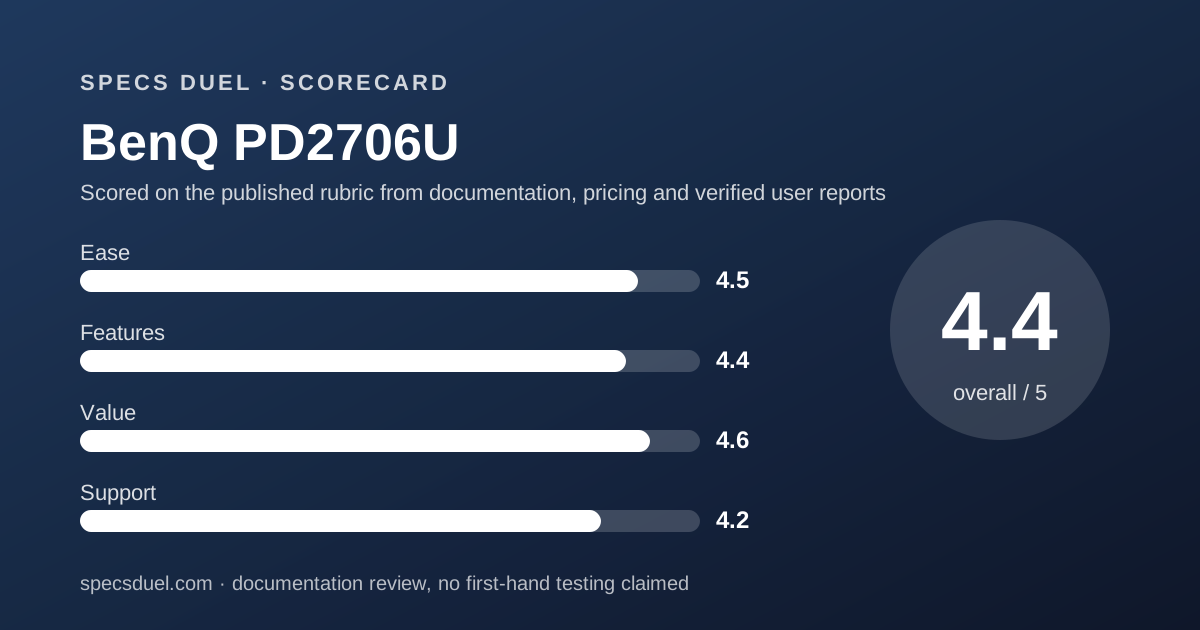
Scored on the published rubric, from documentation, pricing and verified user reports.
Best for: A desk where one keyboard and mouse have to drive two computers, on a 27-inch 4K panel with published sRGB, Rec.709 and P3 figures, at the lowest price in this cluster.
Verdict
The BenQ PD2706U is the value sheet of this 27-inch 4K cluster and the only one here that prints a KVM switch. BenQ publishes an IPS panel at 3840x2160, 163 PPI, 16:9, 60 Hz, 5 ms GtG, 350 nits typical and 400 nits HDR peak, 1200:1 native contrast, 100% sRGB, 100% Rec.709, 95% P3, Delta E at 3 or under, 1.07 billion colours at 10 bit, HDR10 with VESA DisplayHDR 400, 178/178 viewing angles, HDCP 2.2, one HDMI 2.0, one DisplayPort 1.4, one USB-C carrying 90 W of power delivery, a KVM switch, 2.5 W x2 speakers, 110 mm of height travel, 8.3 kg with the stand, and 45 W typical against 230 W maximum power draw. This is a documentation review built from the BenQ en-us overview, specification and store pages plus the BenQ America monitor warranty page, all read on October 13, 2026. Nothing here was plugged in or measured. The weak rows are two video inputs, the heaviest body in the cluster, and a warranty page that contradicts itself on how long the zero bright dot guarantee lasts.
Visit BenQ PD2706U
We have no affiliate relationship with this vendor. Link goes to the official site.
Where it is strong
- Lowest published price in this cluster at $399.99, in stock on the BenQ US store on the read date
- The only sheet here with a KVM switch row, plus DualView, PIP and PBP, Auto Pivot and ICCsync
- 100% sRGB, 100% Rec.709 and 95% P3 with Delta E at 3 or under, and both Pantone Validated and Pantone SkinTone Validated
- VESA DisplayHDR 400 alongside HDR10, which the ASUS sheet lists only in its certificate block
- Thirteen colour modes printed, including DICOM, CAD/CAM, Animation, Darkroom and ePaper
- Hotkey Puck G2, a factory calibration report and four signal cables listed in the box contents
Where it falls short
- Two video inputs only, one HDMI 2.0 and one DisplayPort 1.4, against four on the ASUS sheet
- Heaviest body in this cluster at 8.3 kg with the stand, and the highest published draw at 45 W typical and 230 W maximum
- The warranty page gives the zero bright dot claim window as 30 days from date of purchase in its table while its own text says the guarantee runs for the whole limited warranty period
- No Adobe RGB figure anywhere on the sheet, where ASUS prints 99%
- Only two owner reviews on the BenQ store page, so the 5.00 score there carries no weight
What the BenQ PD2706U actually is
The PD2706U is a 27-inch 4K IPS monitor in the BenQ designer line, sold on the BenQ US store at $399.99. The panel is matte, the backlight is LED and the stand tilts, swivels, pivots and rises 110 mm.
Two rows separate it from the rest of this cluster. The first is the KVM switch, which lets one keyboard and mouse address two connected computers. The second is the price, which is the lowest of the three sheets compared here.
This page is a documentation review. Every figure comes from the BenQ en-us overview page, its specification page, its store page and the BenQ America monitor warranty page, all read on October 13, 2026.
These are published numbers, not measurements, and nothing here was plugged in.
One caution before the table: the older PD2705U carries the same screen size and resolution but its BenQ store page was marked End of Life and out of stock on the same date, with no price shown.
The two model numbers differ by one digit and are not interchangeable.
Who the BenQ PD2706U is best for
The sheet points at a buyer with two machines and one desk.
- A desk running a work laptop and a personal tower, where the KVM row removes a second keyboard
- Design work priced to a budget, at $399.99 with 100% sRGB, 100% Rec.709 and 95% P3 printed
- Print and brand work that references Pantone, since both Pantone Validated and Pantone SkinTone Validated are on the sheet
- A single-cable laptop setup at up to 90 W of published USB-C power delivery
- Buyers who want a physical controller, because the Hotkey Puck G2 is listed in the box rather than as an accessory
- Specialist viewing jobs, given printed DICOM, CAD/CAM, Animation, Darkroom and ePaper modes
- Who should skip it: anyone feeding the screen from three or more sources, since only two video inputs are printed
- Who should skip it: anyone who needs an Adobe RGB figure in writing, which this sheet never gives
The numbers BenQ publishes, and the ones it does not
The display block prints a 27-inch IPS panel at 3840x2160, 163 PPI, 16:9, a matte coating, an LED backlight and 178 degrees in both axes. Refresh is 60 Hz and response is 5 ms GtG.
Brightness is 350 nits typical and 400 nits at HDR peak. Native contrast is 1200:1, which is above the 1000:1 typical figure on both rival sheets. HDR support is printed as HDR10 and VESA DisplayHDR 400, and HDCP is 2.2.
Colour is 100% sRGB, 100% Rec.709 and 95% P3, with Delta E at 3 or under and 1.07 billion colours at 10 bit.
Thirteen colour modes are named, including DCI-P3, Display P3, Rec.709, sRGB, HDR, M-book, DICOM, CAD/CAM, Animation, Darkroom, Low Blue Light, User and ePaper.
What is not on this sheet as of October 13, 2026: any Adobe RGB coverage figure, any Ethernet port, any panel uniformity percentage, and any response time at a second overdrive setting.
The owner score on the store page sits at 5.00 from two reviews, a sample too small to report as a result.
How the price and warranty are structured
The store page showed $399.99 and an in-stock state on October 13, 2026, with an optional Ergo Arm bundle at plus $149.99 and two further accessory bundles priced on the same page.
BenQ states free US shipping on orders over $35 and free returns within 30 days, excluding Hawaii, Alaska and US territories.
The store page also prints the warranty claim in one line: a three-year limited warranty from the purchase date, excluding refurbished products, projector lamps, mounts and all accessories.
The warranty page itself is more precise and more awkward.
It gives three years from the purchase date by the original retail purchaser, parts and labour only, with no advance replacement, for products bought from the BenQ online store or an authorised retailer, serviced in the continental United States, Hawaii and Alaska.
The zero bright dot section is where the page contradicts itself. The prose says that even if only one bright pixel is found, a free monitor exchange is guaranteed during the limited warranty period.
The table beneath it lists PV, SW and PD models as applicable, excluding four named older models, and gives the warranty period for bright sub-pixel defects as 30 days from date of purchase. The page footer reads Page updated: May 2020.
Both figures are printed here because both are on the page.
Ease of use: what the 4.5 is built from
Ease rewards a sheet that reduces the number of objects on a desk. The KVM switch is the clearest example in this cluster: one keyboard, one mouse, two computers, printed as a row rather than implied by a feature page.
The Hotkey Puck G2 is in the box contents, so mode switching does not depend on on-screen buttons. Auto Pivot is printed, meaning the image rotates with the panel.
DualView, PIP and PBP are all listed, and ICCsync is named for keeping colour profiles aligned with the connected machine.
The stand gives tilt from -5 to 20 degrees, swivel 15 degrees each way, a 90 degree pivot and 110 mm of height travel on a 100x100 mm VESA pattern.
Deductions: the height travel is the shortest in this cluster, 110 mm against 120 mm on the Samsung sheet and 130 mm on the ASUS. Swivel is 15 degrees each way where both rivals print 30.
At 8.3 kg with the stand it is the heaviest body here by 1.2 kg.
Features: what the 4.4 is built from
Features are graded on documented hardware, and this sheet wins on switching while losing on inputs. KVM, DualView, PIP and PBP, Auto Pivot, ICCsync and thirteen colour modes are all printed rows.
The colour tooling is the strongest claim on the page. Pantone Validated and Pantone SkinTone Validated are both listed, Calman verified appears alongside them, and a factory calibration report ships in the box.
The ASUS sheet lists Calman Verified and a pre-calibration report but no Pantone row.
HDR is handled cleanly: HDR10 and VESA DisplayHDR 400 both sit in the display block rather than one being tucked into a certificate list. Native contrast at 1200:1 is the highest typical figure in this cluster.
The losses are countable. Two video inputs against four on the ASUS. No DisplayPort daisy chain row. 90 W of power delivery against 96 W. No Adobe RGB figure.
A 4.4 means the switching hardware is the best documented here and the input count is the worst.
Value: what the 4.6 is built from
Value is price against published capability, and $399.99 is the lowest figure in the cluster. It sits $29.01 below the ASUS ProArt PA279CRV at $429.00 and $180.00 below the Samsung ViewFinity S80TB at $579.99, each read on its maker's US page on October 13, 2026.
For the cheapest sheet the buyer still gets DisplayHDR 400, 95% P3, 100% sRGB, 1200:1 native contrast, 90 W power delivery, a KVM switch, a hotkey puck and a calibration report. Against the Samsung sheet that is more printed capability for $180.00 less.
The editorial subtraction that cuts the other way is power. BenQ prints 45 W typical and 230 W maximum; ASUS prints 26.14 W.
That is 18.86 W more at the wall on the typical row, which a buyer running the screen eight hours a day may care about more than the $29.01 saved on purchase.
Also worth weighing: the box contents list is the fullest in this cluster, with DisplayPort, HDMI, USB 3.0 and USB-C cables, a power cable, an IO cover, a calibration report and the puck.
The 4.6 reflects the lowest price in the group paired with the only KVM row.
Support: what the 4.2 is built from
Support is graded on warranty length, written conditions and how clearly the documentation reads. Three years parts and labour matches the ASUS term and triples the one-year figure Samsung states for its model, so the length itself is not the problem.
The problem is the dot policy. One paragraph promises an exchange for a single bright pixel during the limited warranty period. The table directly below gives 30 days from date of purchase.
A buyer cannot plan around a policy that states two different windows on one page, and the page footer dates the content to May 2020.
Conditions elsewhere are stated plainly: shipping covered by BenQ during the warranty period, depot service across the continental United States plus Hawaii and Alaska, best efforts to service within 30 days of receipt, and a single designated return address.
The deductions are the dot contradiction, the 2020 page date and the fact that the specification page carries no warranty row at all, so a buyer has to leave the product page to find the term. Support lands at 4.2.
How this sheet was read, and what a blank row costs
Specs Duel builds the table before writing a sentence.
On BenQ pages the specification tables came back in full on a plain fetch, while the store price needed a browser render; the overview page showed a bare dollar sign with no number until it was rendered.
That split between what a page says and what a page will give up is the same problem the Dreame L40 Ultra Gen 2 spec sheet ran into, where the maker publishes a headline figure and then qualifies it in a disclaimer that has to be read as part of the row.
The method behind both came from the air purifier cluster.
The air purifier shortlist by room size ranks only on figures the makers print, and the two duels behind it, Coway Airmega Mighty against Blueair Blue Pure 311i Max and Levoit Core 300S against Coway Airmega Mighty, carry a difference column instead of a verdict paragraph.
The single sheets show the cost of a blank: the Coway Airmega Mighty and the Blueair Blue Pure 311i Max both print noise bands, while the Levoit Core 300S leaves a row the other two fill.
On this monitor the blank is Adobe RGB, and it is the reason the ASUS sheet wins the colour block.
Limits stated by the vendor
BenQ qualifies several rows on its own pages. The warranty excludes refurbished products, projector lamps, mounts and all accessories, which means the Hotkey Puck G2 and the bundled cables are not covered by the three-year term.
The zero bright dot usage conditions are printed: ambient illuminance above 200 lux, described as a typical office environment, and a viewing distance of more than 35 cm.
A bright sub-pixel is defined as a red, green or blue sub-pixel always lit on a black background.
The free returns offer excludes Hawaii, Alaska, the Virgin Islands, Puerto Rico and other US territories for return shipping. Free shipping applies to US orders over $35.
The bundle prices on the store page are add-on figures rather than totals, listed as plus $149.99 for the Ergo Arm and plus amounts for two other kits. Bundle pricing moves, and the figures here are as displayed on October 13, 2026.
Readers should confirm both the price and the stock state before buying, because the sibling PD2705U page on the same site was marked End of Life and out of stock on the same day.
Alternatives on this site
ASUS ProArt PA279CRV.
Choose it if colour work needs an Adobe RGB figure in writing, or if the desk has three or more video sources: 99% Adobe RGB, 99% DCI-P3, two HDMI, two DisplayPort with daisy chain, 96 W power delivery, 26.14 W draw, 5.78 kg, $429.00.
Otherwise choose the BenQ for the KVM row and $29.01 less.
Samsung ViewFinity S80TB. Choose it only if two Thunderbolt 4 ports decide the purchase.
Otherwise the BenQ costs $180.00 less and publishes a P3 figure, a DisplayHDR certification, a contrast figure of 1200:1 and a power consumption row, none of which the Samsung product page carries.
The Specs Duel 27-inch 4K shortlist ranks all three sheets by purpose, and the ASUS against BenQ duel prints the difference in every row rather than summarising it in prose.
Other clusters on this site start with the air purifier shortlist by room size, or browse the Monitors topic page as the rest of this cluster is published.
Bottom line
The BenQ PD2706U publishes 3840x2160 on a 27-inch IPS panel, 163 PPI, 60 Hz, 5 ms GtG, 350 nits typical and 400 nits HDR peak, 1200:1 native contrast, 100% sRGB, 100% Rec.709, 95% P3, Delta E at 3 or under, HDR10 with DisplayHDR 400, one HDMI 2.0 and one DisplayPort 1.4, 90 W USB-C power delivery, a KVM switch, 110 mm of height travel, 8.3 kg, and 45 W typical against 230 W maximum, all per BenQ pages read October 13, 2026.
It does not publish an Adobe RGB figure, an Ethernet port or a uniformity percentage, and its warranty page gives two different windows for the zero bright dot guarantee.
On our rubric it scores 4.4 overall, second in this cluster behind the ASUS ProArt PA279CRV at 4.5 and well ahead of the Samsung ViewFinity S80TB at 3.5.
It is the right sheet when one keyboard has to drive two computers, or when $399.99 is the ceiling. When the job needs Adobe RGB coverage printed, the ASUS sheet is the only one here that answers.
Visit BenQ PD2706U
We have no affiliate relationship with this vendor. Link goes to the official site.