 Specs

Logitech MX Mechanical Mini
The shortest specification sheet in this cluster and the best returns terms, with battery life printed in days and months instead of hours
Scored on the published rubric, from documentation, pricing and verified user reports.
Best for: A buyer who wants a sealed low-profile mechanical keyboard with the clearest buying terms in this cluster, and who does not need a key count, a polling rate or a switch force to make the decision.
Verdict
The Logitech MX Mechanical Mini publishes the fewest hardware rows of any sheet in this low-profile cluster and the clearest commercial terms. Logitech publishes a 1.03 by 12.31 by 5.18 inch body, which is 26.1 by 312.6 by 131.55 mm, a weight of 21.59 oz or 612 g, a rechargeable 1500 mAh li-polymer cell, up to 15 days of use or up to 10 months with backlighting off, Easy-Switch pairing for three devices, a choice of Tactile Quiet, Clicky or Linear low-profile switches, a Logi Bolt receiver measured and weighed as a separate item, customisation through Logi Options+ on Windows and macOS, and a 1-Year Limited Hardware Warranty. This is a documentation review built from that page rendered in a headless browser on October 26, 2026. Nobody here typed on one. The rows that are missing are the ones a specification site needs: no key count, no polling rate, no switch force, no travel distance, no frame material and no hot-swap statement appeared in the specification data we could read.
Visit Logitech MX Mechanical Mini
We have no affiliate relationship with this vendor. Link goes to the official site.
Where it is strong
- The only sheet in this cluster with free shipping and free returns written on the product page, at 3 to 5 business days and a 30 day return window
- Battery life printed for two lighting states: up to 15 days of use, or up to 10 months with backlighting off
- Measures and weighs the Logi Bolt receiver as its own item at 6.11 by 14.4 by 18.65 mm and 1.68 g, which no rival sheet does for its dongle
- Lists seven operating systems by name with minimum versions for four of them
- States plainly that functions outside Windows and macOS work without software but only at a basic level
- Carries a visible SKU, 920-010550 for the Graphite English US build, so the exact unit being priced is identifiable
Where it falls short
- No key count in the specification data we could read, so the layout cannot be stated as a number
- No polling rate in any mode, which is the single most useful wireless keyboard row and both rival sheets publish it
- No switch actuation force, no travel distance and no acoustic figure for any of the three switch styles
- No hot-swap row, no frame material row and no operating temperature row
- Battery life given in days and months rather than hours, so it cannot be compared row for row against sheets that use hours
- Most expensive sheet here, listed at $159.99 with the lower $129.99 figure attached to a promotion the page dates to November 1
At a glance
| Height | 1.03 in (26.1 mm) |
|---|---|
| Width | 12.31 in (312.6 mm) |
| Depth | 5.18 in (131.55 mm) |
| Weight | 21.59 oz (612 g) |
| Receiver size | Logi Bolt: 0.24 x 0.57 x 0.73 in (6.11 x 14.4 x 18.65 mm) |
| Receiver weight | 0.06 oz (1.68 g) |
| Battery | Rechargeable Li-Po, 1500 mAh |
| Battery life | Up to 15 days, or up to 10 months with backlighting off; page notes life may vary with use |
| Connection | Bluetooth Low Energy or Logi Bolt USB receiver; receiver requires a USB-A port |
| Multi-device | Easy-Switch across up to 3 devices |
| Switch styles | Tactile Quiet, Clicky or Linear, low-profile |
| Software | Logi Options+ on Windows and macOS; internet access required to download it |
| Operating systems | Windows 10 and 11 or later, macOS 10.15 or later, iOS 14 or later, iPadOS 14 or later, Linux, ChromeOS, Android 8.0 or later |
| Key count | No figure in the specification data we could read on October 26, 2026 |
| Polling rate | No figure in the specification data we could read on October 26, 2026 |
| Switch force and travel | No figures in the specification data we could read on October 26, 2026 |
| Hot-swap | No row on the page we could read on October 26, 2026 |
| Shipping and returns | Free shipping stated at 3 to 5 business days; free returns within 30 days of purchase |
| Warranty | 1-Year Limited Hardware Warranty |
| Price | $159.99 list, Special Pricing shown as $129.99 to $159.99, read October 26, 2026 |
| Pricing note | $129.99 to $159.99 in the page product markup, list $159.99, promotion dated through November 1 (read October 26, 2026) |
What the Logitech MX Mechanical Mini actually is
The MX Mechanical Mini is a compact low-profile mechanical keyboard aimed at office and productivity buyers, listed at $159.99 on logitech.com and read October 26, 2026.
It sits in the same physical class as the other two sheets in this cluster, at 312.6 by 131.55 mm and 612 g, but it is sold on a different premise.
The switch style is chosen at purchase from Tactile Quiet, Clicky or Linear. Nothing on the page suggests that choice can be changed later.
For Specs Duel that premise shows up as a short sheet. This page documents the commercial side of the purchase well and the hardware side thinly, and the gap between those two is the story of this review.
Who the MX Mechanical Mini sheet is for
This sheet suits a buyer whose questions are about the transaction rather than the switches:
- Someone who wants a free 30 day return window written on the product page before ordering
- Someone buying for a managed work machine, where a documented software app matters more than open firmware
- Someone who will never open the board and does not need a hot-swap row
- Someone who counts battery life in months rather than in hours between charges
- Someone who needs minimum operating system versions in writing for a procurement form
- A buyer who wants the wireless receiver measured, because it has to fit next to something else on a dock
- Someone pairing a keyboard with a docking monitor such as the BenQ PD2706U, where the USB-A port count is already decided
The rows this sheet does not have
Four rows that a keyboard buyer would reasonably expect are absent from the specification data we could read on October 26, 2026.
There is no key count. There is no polling rate in either Bluetooth or receiver mode. There is no actuation force or travel distance for any of the three switch styles. There is no hot-swap statement either way.
Three more are missing: frame material, operating temperature range and backlight mode count.
We are not saying Logitech refuses to publish those figures. We are saying the rendered page, searched for exact strings on that date, did not contain them.
The page has an accordion labelled In the Box whose contents did not render either. So some of the sheet is simply out of reach from a static read.
What we can say is that a buyer comparing on numbers cannot complete the comparison from this page.
Battery life in days and months, which cannot be compared row for row
The battery row itself is precise: a rechargeable li-polymer cell at 1500 mAh.
The life rows are not in the same units as anyone else. Logitech prints up to 15 days of use, or up to 10 months with backlighting off, and adds that life may vary based on user and computing conditions.
Both rival sheets in this cluster print hours. Keychron gives around 73 hours with the backlight off, NuPhy gives up to 220 hours with lights off.
Fifteen days and ten months are honest consumer figures and useless engineering figures, because they hide the assumed duty cycle. A day of what? Eight hours of typing or twenty-four hours of idle standby?
Without that denominator the row cannot be converted into hours, so our duel table marks it as published on a different basis rather than converting it.
The receiver is measured, which no rival sheet bothers to do
One row here is better documented than anything in the cluster, and it is an accessory.
The Logi Bolt USB receiver gets its own dimension set at 0.24 by 0.57 by 0.73 inches, which is 6.11 by 14.4 by 18.65 mm, and its own weight at 0.06 oz or 1.68 g.
That is a strange thing to publish and a genuinely useful one. A dongle that protrudes 18.65 mm from a laptop side is a dongle that will catch on a sleeve.
The page also states the receiver needs a USB-A port. On a machine that only has USB-C, that is a dongle for a dongle, and the sheet says so instead of leaving it to be discovered.
Both rival sheets in this cluster ship a 2.4 GHz receiver and neither prints a single figure about it.
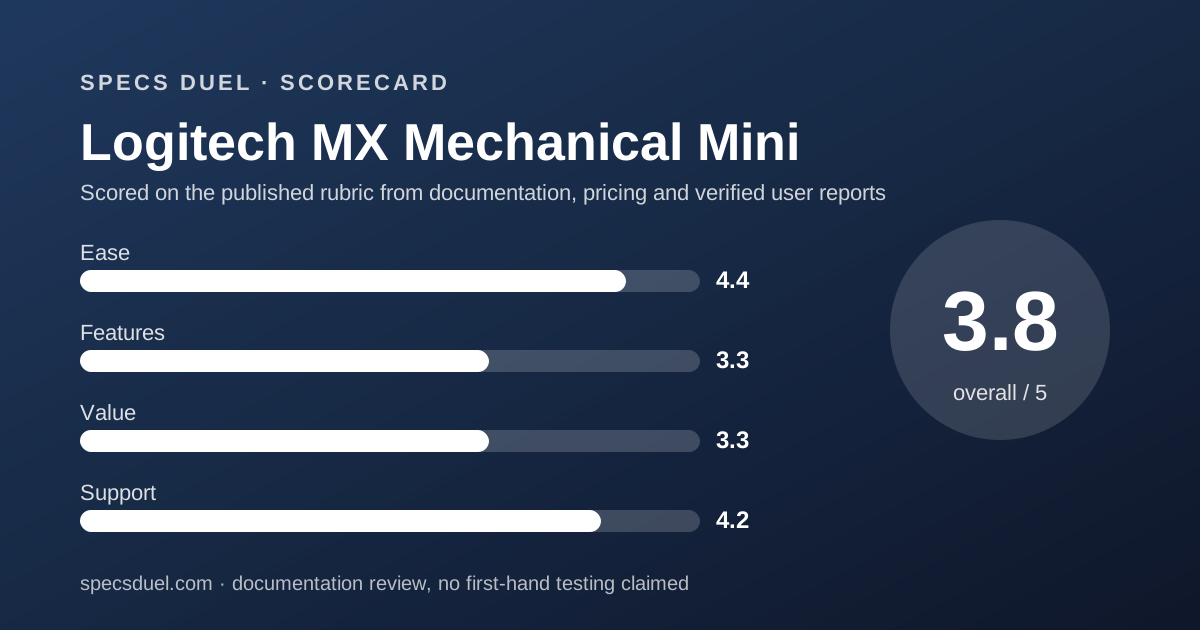
Ease of use: what the 4.4 is built from
This is the highest ease score in the cluster, and it comes entirely from the operating system and setup rows.
Seven systems are named: Windows 10 and 11 or later, macOS 10.15 or later, iOS 14 or later, iPadOS 14 or later, Linux, ChromeOS and Android 8.0 or later.
The page then qualifies that honestly. Outside Windows and macOS, it states that device basic functions will be supported without software. It does not pretend full feature parity.
Easy-Switch pairs three devices. Customisation runs through Logi Options+, and the page states internet access is required to download it.
Backlight behaviour is described rather than numbered: keys wake as hands approach and adjust to ambient lighting. That is a behaviour row, not a specification row, and it is the one the score rests on.
Features: what the 3.3 is built from
This is the lowest feature score in the cluster and it is a score about documentation, not about the keyboard.
What is documented: three switch styles by name, proximity and ambient backlighting, Easy-Switch for three devices, Logi Options+ support, a measured receiver, and four body measurements including the 26.1 mm height.
What is not documented: everything a keyboard enthusiast would check first. No key count, no polling rate, no switch force, no travel, no hot-swap, no frame material.
Against a sheet that names its controller part number and splits polling by radio, this reads like a different kind of document aimed at a different kind of buyer.
That is a legitimate product decision. It is also the reason a specification comparison site cannot score this sheet higher: there is less here to compare.
Value: what the 3.3 is built from
This is the most expensive sheet in the cluster on list price and the thinnest on hardware rows, which is the combination the score reflects.
The pricing was confirmed two ways on October 26, 2026. The visible page showed a Special Pricing label with $129.99 and $159.99, with $159.99 shown as the standing figure.
The embedded product markup gave the same pair: a low price of 129.99 and a high price of 159.99, both in US dollars.
The page attached the lower figure to a promotion it dated through November 1, so $129.99 should be read as a dated offer rather than a shelf price.
One oddity: the same markup block set an offer count of 1 while carrying a two-figure price range. Those two statements do not sit together, and we are reporting both rather than picking one.
Against $109.99 for the Keychron sheet and $119.95 for the NuPhy sheet, the list price here is 31 to 46 percent higher by our own arithmetic.
Support: what the 4.2 is built from
This is the best support score in the cluster, and it is the one area where the short sheet wins outright.
The warranty string is a 1-Year Limited Hardware Warranty, the same headline term as both rivals.
The difference is everything around it. The product page states free shipping at 3 to 5 business days on all orders, and free returns within 30 days of purchase.
For comparison inside this cluster, the Keychron warranty page requires a non-defective return to be requested within 7 days and has the buyer pay return shipping. The NuPhy warranty page does not mention returns at all.
A 30 day free return window on a keyboard is worth more than most specification rows, because typing feel is the one property no sheet can describe and no buyer can judge before the box is open.
What the published rating says
The page carried an aggregate rating of 4.46 out of 5 from 136 reviews in its product markup when we read it on October 26, 2026.
One hundred and thirty-six sits between the two rivals. The Keychron page showed 12 and the NuPhy page showed 878 on the same day.
We do not grade any of these numbers. A vendor-hosted review widget sits on the vendor's own page under the vendor's own moderation rules.
The only thing worth drawing from the three figures together is that none of them is comparable to the others, because none of the three pages states how reviews are collected or filtered.
If you want a category where the maker's own page shows no owner score at all, the Cosori Pro LE 5.0-Quart sheet and the Ninja AF181 sheet are worth a look.
How this sheet was read
The product page was rendered in a headless browser on October 26, 2026 and searched for exact strings rather than summarised.
That was necessary. The specification figures on this page live in a JavaScript data structure as labelled facets, so a plain fetch returns marketing copy and a cookie banner.
The pricing was cross-checked between the visible page text and the embedded product markup, and both gave the same two numbers. Where two reads disagree, the number loses its standing as a source and we drop it.
The Specs and Compatibility and In the Box accordions did not render their contents, so there may be rows on this page we did not see.
That is why every missing row above is written as could not be read on that date. It is a statement about our read, not about Logitech.
Bottom line
The Logitech MX Mechanical Mini is the easiest of these three to buy and the hardest to compare.
Buy it if you want a sealed low-profile mechanical keyboard with a 30 day free return window and seven named operating systems, and you are content to judge the switches in your own hands rather than on paper.
Skip it if the purchase turns on numbers. The key count, polling rate, switch force, travel distance and hot-swap status were all absent from the specification data we could read, and it costs the most of the three.
For another pair where one maker publishes a full table and the other publishes a brochure, read Coway AP-1512HH against Blueair 311i Max and Levoit Core 300S against Coway AP-1512HH.
The air fryer shortlist by basket size and the ECOVACS DEEBOT N30 Pro Omni sheet show the same split in two more categories.
Buy it if
- The buying terms matter as much as the hardware, because this is the only sheet here that prints free shipping and a 30 day free return window
- You want a sealed keyboard, since nothing on this page suggests the switches are meant to be removed
- Three paired devices and one software app is the whole requirement, which this sheet documents cleanly
- Backlight behaviour matters more than backlight settings, because proximity wake and ambient adjustment are both described
Skip it if
- You compare keyboards on numbers, because the key count, polling rate, switch force and travel distance are all absent from the readable specification data
- Battery life has to be comparable, since this page uses days and months while both rival sheets use hours
- Price is a constraint, at a $159.99 list against $109.99 and $119.95 for the two rival sheets in this cluster
Frequently asked
How long does the MX Mechanical Mini battery last?
Logitech publishes up to 15 days on a full charge, or up to 10 months with backlighting turned off, from a 1500 mAh rechargeable li-polymer cell. The page adds that battery life may vary based on user and computing conditions, read October 26, 2026.
How many keys does the MX Mechanical Mini have?
No key count appeared in the specification data we could read on October 26, 2026. The page describes a space-saving form factor and a full-size sibling with a numpad, but it never prints a number. Treat any key count you see elsewhere as coming from a different source.
Is the MX Mechanical Mini hot-swappable?
No hot-swap row appeared on the page we could read on October 26, 2026. Logitech offers a choice of three factory-fitted switch styles, Tactile Quiet, Clicky and Linear, which is a purchase decision rather than a later change.
How does the MX Mechanical Mini connect?
Two ways. Bluetooth Low Energy, which the page lists as a system requirement, or the bundled Logi Bolt USB receiver, which needs a USB-A port. Easy-Switch pairs up to three devices. No polling rate is published for either mode.
How much does the MX Mechanical Mini cost?
The product markup showed a low price of $129.99 and a high price of $159.99 in US dollars on October 26, 2026, and the visible page showed both figures under a Special Pricing label dated through November 1. The list price is $159.99.
What does Logitech cover on this keyboard?
A 1-Year Limited Hardware Warranty, stated in the page specification data. The same page states free shipping at 3 to 5 business days on all orders and free returns within 30 days of purchase, which is the widest return window in this cluster.
Sources
- Logitech MX Mechanical Mini product page (dimension and weight facets, battery facets, Easy-Switch facet, system requirements block, warranty string, visible Special Pricing, embedded product markup with aggregate offer and aggregate rating) - checked October 26, 2026
Update history
- October 26, 2026 - First publication. Product page read in a headless render on October 26, 2026; Specs and In the Box accordions did not render.
Visit Logitech MX Mechanical Mini
We have no affiliate relationship with this vendor. Link goes to the official site.